|
|
|
|
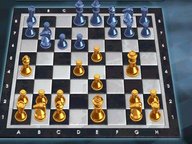
Kasparov Chessmate brings the royal game to the Internet Gaming Zone. The object of Kasparov Chessmate is the object of chess: move your pieces on the chessboard and checkmate your opponent's King. Host a game at an open table, use the chat feature to recruit an opponent, and when both players are ready the host launches the game. Set up your board and play today!
|
|
|
| What You'll Need |
|
|
- A FREE Zone Name and password (Sign up now!)
- The Kasparov Chessmate CD-ROM installed on your hard drive
- Windows 98/Me/2000/XP
- Pentium 266 MHz or higher, 32 MB RAM, 30 MB hard disk space
- 4X CD-ROM drive; Windows-compatible sound card recommended
|
|
| How to Play |
|
|
- Sign up for a FREE Zone membership.
- Once you have a Zone membership, you can play Kasparov Chessmate anytime you want. Enter your Zone Name and password to log on to the Zone and select a game room.
- Make sure the game is installed on your computer and the CD-ROM is in your drive. If the game auto-starts when you place it in the drive, exit out of the screen; the game will start when the host launches it.
- Hosting and joining a game are easy: To host, click Quick Host or the Host button, set the game parameters, and wait for another player to join, then click Launch. To join, click Quick Join or the Join icon at a table already occupied by a host and wait for the host to launch the game. You can find out more about hosting and joining in our Tutorial
.
|
|